
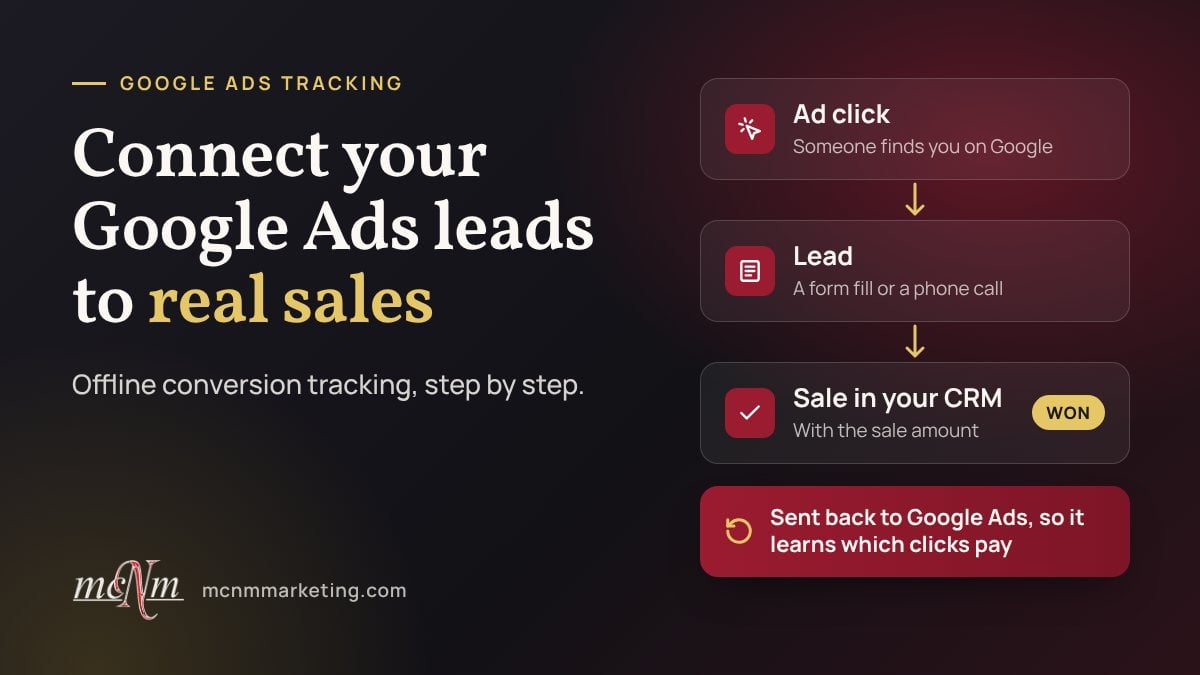
Google Ads offline conversion tracking connects the leads your ads bring in to the sales those leads turn into. Your website records the lead, your CRM records the sale, and you send that sale and its dollar amount back to Google Ads, which matches it to the original ad click. You see cost per sale instead of cost per lead, and Google’s bidding learns which clicks become paying customers.
If you run a roofing company in Las Vegas, a med spa in Henderson or a tour business in Sedona, this is the difference between “the ads bring leads” and “the ads pay for themselves.” This guide covers how it works, how to connect your CRM and phone calls, and the mistakes that quietly break it.
TL;DR
- Lead counts can make every campaign look good. Sales data shows which campaigns actually pay.
- Google recommends enhanced conversions for leads. It matches sales in your CRM to ad clicks using the hashed email or phone number a lead typed into your form.
- HubSpot and Salesforce connect to Google Ads Data Manager directly, GoHighLevel can send conversions on its own, and a Google Sheet works for everything else.
- Upload each sale within 63 days of the click, or within 90 days if you upload Google click IDs.
- Track phone calls too, or call-driven sales never reach Google Ads.
Table of Contents
- Why lead counts mislead your Google Ads
- What is Google Ads offline conversion tracking?
- How do I connect Google Ads leads to sales revenue?
- Connect your CRM: HubSpot, Salesforce, GoHighLevel and Sheets
- Don’t lose sales that start with a phone call
- What changes once Google sees your revenue
- Common mistakes
- Our perspective
- When to get help
- FAQ
- Next step
- Sources
Why lead counts mislead your Google Ads
Google Ads works toward whatever you count as a conversion. If you count form fills, it finds more people who fill out forms, including the ones who never buy.
Picture two campaigns for an HVAC company in Henderson:
| Campaign | Leads | Cost per lead | Sales | Cost per sale |
|---|---|---|---|---|
| A: broad “AC repair” terms | 40 | $50 | 2 | $1,000 |
| B: “AC replacement” terms | 15 | $90 | 5 | $270 |
Judged by cost per lead, Campaign A wins. Judged by sales, Campaign B wins by a mile. Without sales data, you and Google’s bidding would both move money to the wrong campaign. (These numbers are an example, not client results.)
What is Google Ads offline conversion tracking?
Offline conversion tracking lets you import results that happen after the click and away from your website, such as a signed contract or a paid invoice. Google describes it as a way to see what happens in the offline world after someone clicks your ads.
There are two ways to match a sale to the click that started it.
Enhanced conversions for leads (start here)
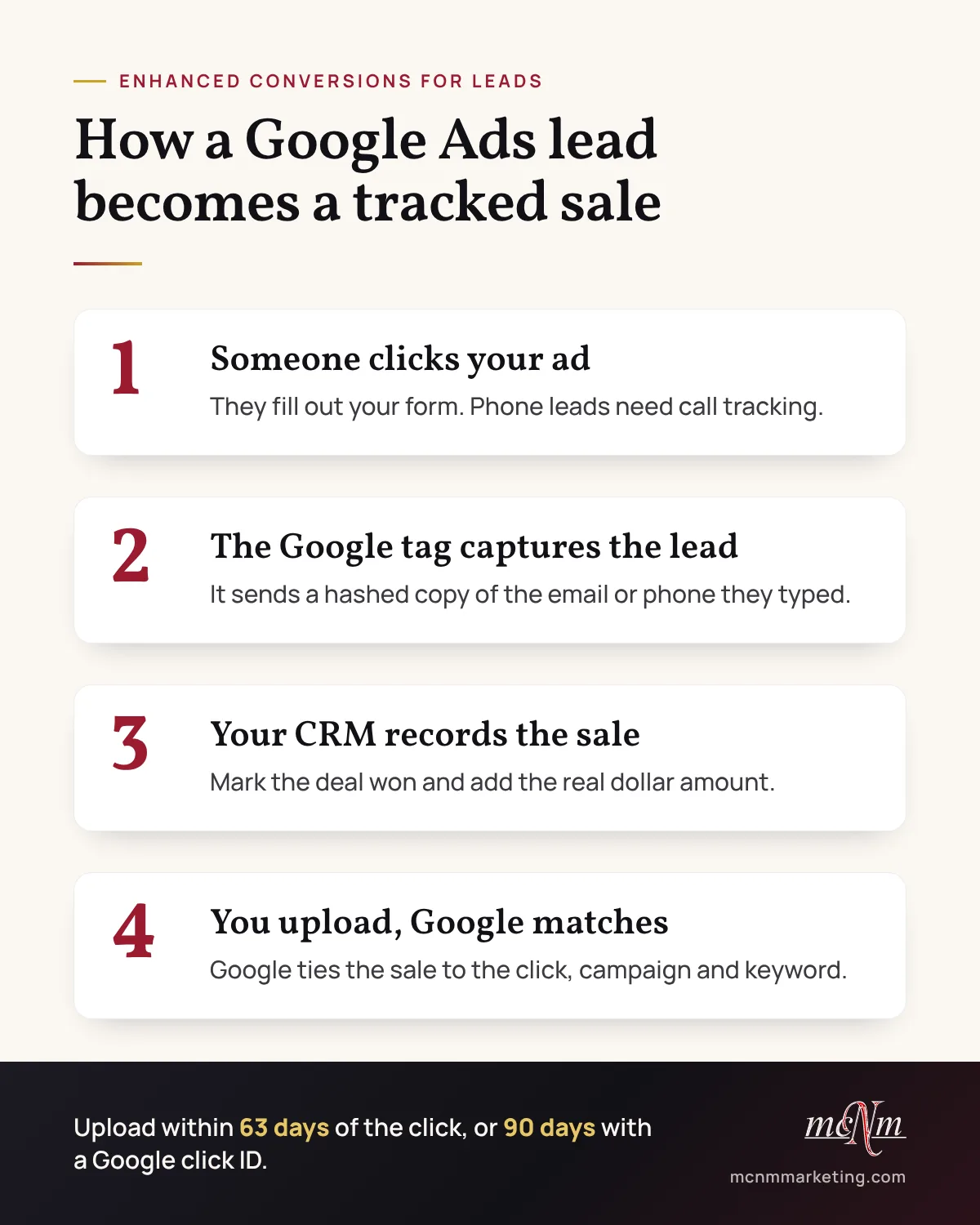
When someone submits your form, the Google tag sends Google a hashed (scrambled) copy of the email or phone number they typed. When that lead buys, you upload the sale. Google matches it to the data collected on your website and to signed-in Google accounts that engaged with your ads.
Google calls this an upgraded version of offline conversion import, and it recommends starting with it if you haven’t set up offline imports before.
Google click ID (GCLID) imports
The older method saves the Google click ID, or GCLID, from the ad click in a hidden form field and stores it in your CRM. You upload each sale with that ID attached. It still works, and you can send the click ID and the hashed email or phone with the same sale.
| Enhanced conversions for leads | GCLID import | |
|---|---|---|
| Matches on | Hashed email or phone from your form | The Google click ID |
| Upload deadline | 63 days after the click | 90 days after the click |
| Website changes | Google tag captures the form data | Hidden form field plus a CRM field for the click ID |
| Best for | Most new setups | Existing setups and longer sales cycles |
How do I connect Google Ads leads to sales revenue?
Follow these steps in order. Skipping the first one is how most setups go wrong.
- Check your lead tracking. Submit your own website form and call the number on your website. Confirm each lead lands in your CRM and that Google Ads counts it once.
- Turn on enhanced conversions for leads. You’ll find it in your Google Ads conversion settings.
- Pick the stages that matter. Create an offline conversion for each one, such as “qualified lead,” “estimate sent” and “closed-won.”
- Connect your CRM. Use Google Ads Data Manager or your CRM’s own integration. Details are in the next section.
- Send real dollar values. Pass the actual sale amount with every closed deal, not a placeholder.
- Upload on a schedule. Daily or weekly uploads keep you inside the deadlines: 63 days for email or phone matches and 90 days for click IDs. If your sales cycle runs longer, upload an earlier stage that happens inside the window.
- Wait before you change bidding. Google suggests uploading values for 3 weeks or 1-2 conversion cycles, whichever is longer, before you turn on value-based bidding.
Connect your CRM: HubSpot, Salesforce, GoHighLevel and Sheets
Google Ads Data Manager is Google’s tool for bringing your customer data into your ad account. You connect a data source once, map your fields, and it imports on a schedule.
HubSpot and Salesforce
Both connect to Data Manager directly. On the first successful run, Data Manager imports the last 14 days of data, then picks up every change made since the last run.
GoHighLevel
GoHighLevel can send conversions to Google Ads on its own. Its Ad Manager creates and manages Google Ads offline conversion actions, and the “Add to Google Ads” workflow action sends a conversion event when your workflow fires, such as when a deal is marked won. Still choosing a CRM? See our GoHighLevel vs HubSpot comparison.
Google Sheets and Zapier for everything else
No direct connection? Keep a Google Sheet of won customers with the sale date and time, the email or phone they used (or the click ID), and the sale amount. Data Manager reads Google Sheets and imports conversions from the past 90 days on every run. Google also documents Zapier as a way to send offline conversions from other tools.
Don’t lose sales that start with a phone call
Many local customers call instead of filling out a form. A call has no email field, so enhanced conversions has nothing to match unless the call is tied back to the ad click.
The fix is call tracking that records which ad, keyword or page produced each call, plus a CRM record for every job booked from a call. Our call tracking guide for small businesses covers the setup, from tracking numbers to recording rules.
Then answer the phone. A tracked call that goes to voicemail is still a lost sale, and missed-call text-back catches the callers you can’t pick up.
What changes once Google sees your revenue
Your reports get honest. You see cost per sale and revenue by campaign and keyword, so budget decisions stop being guesses.
Your bidding can chase revenue. Maximize conversion value aims to get the most conversion value from your budget, and Target ROAS aims for the return you set. Google notes that Maximize conversion value needs conversion tracking with transaction-specific values first.
Keep your uploads steady before and after the switch. Google warns that delays in uploading conversions hurt Smart Bidding performance.
Common mistakes
- Bidding on form fills forever. Once sales data flows, make a qualified lead or a sale the goal Google bids toward.
- Uploading placeholder values. A $1 value on every sale hides which customers are worth more.
- Letting uploads lapse. Google won’t accept sales uploaded after the deadline, so a month of missed uploads can mean a month of lost data.
- Changing the lead’s email in the CRM. Keep the email and phone the person typed on the form so the records can match.
- Ignoring phone calls. If most of your leads call, call tracking matters more than form tracking.
- Judging too soon. Give the data a full sales cycle before you cut a campaign.
Our perspective
A lead is a promise. A sale is the proof. If Google can’t see which clicks became paying customers, its bidding works from half the story, and so does your budget.
Start with the stage you can track today, even if it’s only a booked estimate, and add revenue as your CRM catches up. Steady, honest data beats a perfect setup you never finish.
Michael O. Franklin Jr.
When to get help
You can set this up yourself if your CRM connects directly and your forms already feed it. Get help if leads come in through several forms and phone lines, your CRM needs new fields, or you’re about to switch bidding to revenue. A mistake there teaches Google to chase the wrong customers.
MCNM is a Las Vegas agency serving businesses across Southern Nevada, Southern California and Northern Arizona. Two of our services cover this work:
- Google Ads management: a flat $1,497 per month plus ad spend, including campaign builds, conversion tracking, landing pages and weekly optimization.
- Marketing automation and CRM: HubSpot and GoHighLevel setup with lead-source attribution and reporting.
Every price is published on our pricing page. Comparing options? See what Google Ads management costs in Las Vegas.
FAQ
Do I need a CRM to track Google Ads sales?
No. A Google Sheet works. List each won customer with the sale date and time, the email or phone they used on your form, and the sale amount. Connect the sheet through Google Ads Data Manager, and it imports conversions from the past 90 days on every run. A CRM just makes the process automatic.
How long after the click can I upload a sale?
Google accepts sales matched by email or phone up to 63 days after the click, and sales matched by Google click ID up to 90 days after. If your sales cycle runs longer, upload an earlier milestone, like a qualified lead or a sent estimate, that happens inside the window.
Is enhanced conversions for leads the same as offline conversion import?
It’s an upgraded version of it. Instead of relying only on a click ID stored in your CRM, it matches sales using the hashed email or phone number a lead typed into your form. You can send both. Google recommends it for anyone setting up offline imports for the first time.
What if most of my leads call instead of filling out a form?
Then track calls separately. Use call tracking that ties each call to the ad click that produced it, and log every job booked from a call in your CRM. Without that link, call-driven sales never reach Google Ads, and your best campaigns can look like your worst.
Next step
Want to know which of your ads bring paying customers? Request your free marketing audit or call us at (702) 608-4226. We will look at your tracking, your calls and your follow-up, and show you what to fix first.
Sources
- Set up offline conversions using Google Click ID (GCLID) (Google Ads Help)
- About enhanced conversions (Google Ads Help)
- Offline conversion imports FAQs (Google Ads Help)
- Prepare your data for import (Google Ads Data Manager)
- About Maximize conversion value bidding (Google Ads Help)
- About Smart Bidding using value-based bidding (Google Ads Help)
- Ad Manager: Create and manage Google Ads offline conversions (HighLevel)
- Workflow Action: Add to Google Ads (HighLevel)
Leave a Reply