

Church SEO is the work of helping people who search Google find your church, its service times and its website. The fastest wins come from three things: a correct Google Business Profile, a website Google can read on a phone, and a few pages that answer what a first-time guest asks.
This guide is for church leaders and Christian business owners in Las Vegas, Henderson, North Las Vegas, Southern California and Northern Arizona. It covers local search only: how a new family nearby finds you. It does not cover fundraising. If you want a team to run the work, MCNM Marketing is a Las Vegas agency that starts every engagement with a free marketing audit.
TL;DR
- Google defines SEO as helping search engines understand your content and helping people find your site. For a church, that means being easy to find for “church near me” searches.
- Start with your Google Business Profile. Name, address, phone, hours and category must match your website exactly.
- Make service times and your address real text on the page, not a picture, and test the site on a phone.
- Add a plan-a-visit page and one page per ministry, written around the questions guests ask.
- Track Search Console and calls or direction requests each month, and fix what you find.
Table of Contents
- What church SEO really is
- Step 1: Fix your Google Business Profile first
- Step 2: Make your website easy for Google to read
- Church SEO in Las Vegas, Henderson and beyond: pick words your neighbors use
- Step 3: Build pages around guest questions
- Step 4: Multiple campuses and locations
- Step 5: Measure what matters
- Common mistakes
- What church SEO support includes
- Our perspective
- Get a clear picture of where you stand
- FAQ
- Sources
What church SEO really is
Search engine optimization (SEO) is the set of changes that help Google show your pages to the right people. Google’s own SEO Starter Guide says sites that follow its Search Essentials are more likely to appear in results.
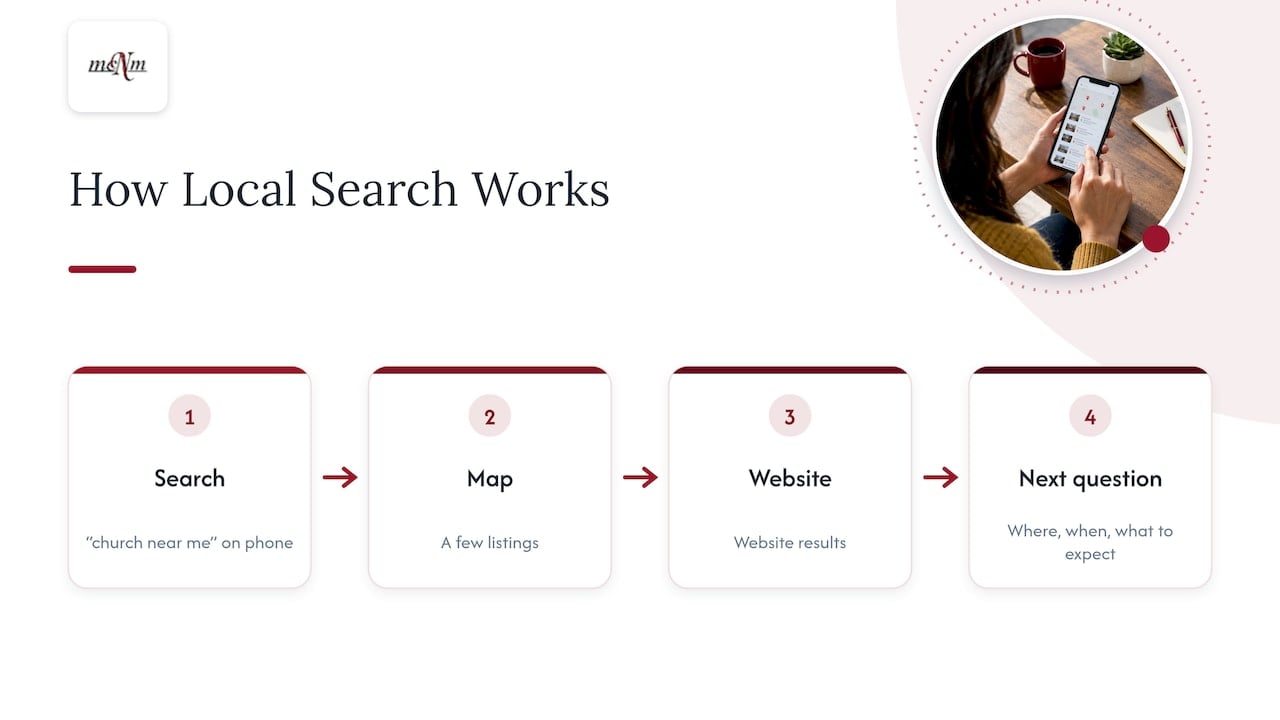
For a church, the searcher is usually a person who just moved, a family with kids, or someone who wants a quiet place to start. They type “church near me” or “Sunday service Henderson” on a phone. Google shows a map with a few listings, then website results.
Your goal is to be in that map and to have a site that answers the next question fast: where, when, what to expect.
Step 1: Fix your Google Business Profile first
Your Google Business Profile is the free listing that appears on Google Search and Maps. For a local search, it often matters more than the website. Do it first.
- Claim it, don’t duplicate it. Search your church name in Google Maps. If a listing exists, claim it. A second listing splits your reviews and confuses Google.
- Use a church-owned Google account. Do not tie the profile to one volunteer’s personal email. When that person moves on, you lose access.
- Pick the most specific category. Choose the one that matches your tradition, such as Baptist church or Non-denominational church, rather than a general label.
- Match your details everywhere. The name, address and phone number must read the same on the profile, your site footer and your contact page. Search people call this NAP: name, address, phone.
- Add hours that are true. Include service times and holiday hours. Update them for Easter and Christmas services.
- Add real photos. Show the building from the street, the entrance and the sanctuary. A guest who can picture the parking lot is more likely to walk in.
- Ask members for honest reviews. Never offer rewards for reviews, and never write them yourself.
- Reply to reviews kindly. Keep private pastoral matters out of public replies.
Meeting in a school or rented hall? List the address where people actually park and walk in, and say which entrance to use in the description. This one detail saves first-time guests a lot of frustration.
Our Google Business Profile optimization checklist walks through every field. If you would rather hand it off, our Google Business Profile Sprint is a one-off project listed at $997.
Step 2: Make your website easy for Google to read
Google says the technical bar is low. In its Search Essentials update, the Search team calls the requirements “few and simple”: publish content in a format Google can index, and let Google reach it.
For most church sites, that comes down to a short list.
Check that Google has indexed your site
The SEO Starter Guide suggests a quick test: type site: followed by your web address into Google. If your pages show up, they are indexed. If nothing shows, something is blocking Google, and that is the first thing to fix.
Put key facts in text, not images
Service times, address and phone number should be typed on the page. A flyer image with times baked in looks nice, but Google cannot reliably read it, and screen readers cannot either. Keep the flyer if you like it. Add the text beside it.
Design for the phone
Google now uses the mobile version of your pages for indexing. Its mobile-first indexing guidance says content such as structured data and image alt text must be on the mobile pages too. Whatever your desktop site shows, the phone version must show it as well.
Test it yourself. Stand in your parking lot, use cell data instead of Wi-Fi, and load your homepage. Can you find the service time without pinching and zooming? Does it load quickly? If not, your guests are having the same experience.
Use clear titles, headings and links
- Give each page its own title that says what it is, such as “Plan Your Visit | Your Church Name, Henderson NV.”
- Use one main heading per page.
- Use plain, descriptive page addresses, like /plan-your-visit.
- Link to your key pages from the menu and the homepage so Google can find them.
- Add short alt text to images that describes them.
Slow, bloated themes hurt. A lean WordPress site that loads fast on a phone is usually enough. Our WordPress Website Care Plan is listed at $197 per month for ongoing maintenance, and our website design and build work is mobile-first.
Church SEO in Las Vegas, Henderson and beyond: pick words your neighbors use
Keyword research sounds technical. It is just learning how people in your area describe what you offer.
Google’s free Search Console shows which searches already bring people to your site, how many times you appeared, and how many clicked. Open the performance report first. You may find people already find you by pastor name or a ministry, and not at all by “church in North Las Vegas.”
Then match words to pages:
| Search a guest might type | Page that should answer it |
|---|---|
| church near me Henderson NV | Homepage with city, address and service times |
| what to expect at church | Plan-a-visit page |
| kids ministry Las Vegas | Children’s ministry page |
| Spanish-language church service Las Vegas | A page for that service, written in Spanish where it fits |
| church in Sedona or Prescott | One page per campus or meeting place |
Use the city name naturally in the title, main heading, first paragraph and address. Do not stuff it in over and over. Write the way you would talk to a visitor at the door.
Seasonal and tourist towns
Churches in Flagstaff, Sedona and Prescott see visitors who are traveling, not moving in. A page that says “visiting Sedona this weekend?” with times, parking and what to wear can serve them. Las Vegas has the same pattern with workers on night shifts. If you hold a late or midweek service, say so in text, since those searchers have a different schedule.
Step 3: Build pages around guest questions
A guest’s first visit starts online. Think about what a nervous first-timer wants to know, and answer it on its own page.
- Plan a visit. Address, parking, entrance, service length, dress, and what happens with kids.
- Ministry pages. One page each for youth, kids, small groups, recovery or support groups, and any language-specific service.
- About and beliefs. Short, warm and clear about who you are.
- Contact. Phone, email, address and a map.
Good content connects a real need to what your church offers. Many people search for help with a life problem long before they search for a church. A page on a marriage class, a grief support group or a teen program can meet them where they are. Write it clearly. If a reader cannot tell in five seconds what the page is for, they leave.
Link your address on the website to your Google Maps listing from the homepage, footer and contact page. This helps tie your site to your profile.
Blogging is optional. A few strong, accurate pages beat a blog nobody updates.
Step 4: Multiple campuses and locations
If you run more than one campus, each staffed location needs its own profile and its own page on your site. Each page should carry that campus’s address, phone, times and photos. Do not copy the same text across every page and swap the city name.
Our guides on location page SEO show how to build these pages so they stand on their own. For brands across Southern California, see our multi-location local SEO page.
Step 5: Measure what matters
SEO is not a one-time project. Once a month, spend 15 minutes on this routine:
- Open Search Console. Note which searches and pages gained clicks.
- Check that your key pages are still indexed.
- Look at your Business Profile: calls, direction requests and website clicks.
- Read new reviews and reply.
- Confirm service times and holiday hours are still right.
- Write down what you changed, so you can tell a real gain from a seasonal bump around Easter or Christmas.
Track actions, not just visits. A guest who taps for directions is worth more than ten who bounce.
For a quick view of where you stand, run our free Local SEO Checkup.
Common mistakes
- Two or more profiles for one church. Merge or remove the extras.
- Old hours. A wrong service time is the fastest way to lose a visitor.
- Keywords in the profile name. Use your real name only.
- Times and address only in images.
- A slow phone site.
- Missed calls. A guest who calls on Saturday and reaches voicemail may not call again. Our free Missed Call Calculator shows what that costs.
What church SEO support includes
When you hire help, look for work you can see and check: a profile cleanup, a site review, new pages, a monthly report from Search Console and your Business Profile. Scope varies by provider, so ask for the list in writing.
Our published plans for local search are:
| Plan | Price |
|---|---|
| Google Business Profile Sprint | $997 one-off |
| Local SEO Starter | $997 per month |
| Growth SEO & Content | $1,997 per month |
| Review Generation Engine | $397 per month |
| Deep-Dive SEO & Marketing Audit | $497 one-off |
| Local Search Visibility Report | $97 one-off |
Every price is on our pricing page. Our local SEO packages page shows what each one covers.
Our perspective
Most churches we talk to do not have an SEO problem. They have a findability problem. Someone nearby searches on a Saturday night, and the listing shows the wrong time or a phone number nobody answers.
That is why we start with the basics: Search Console data, a correct Business Profile, a site that works on a phone, and call tracking. We judge every plan by calls, visits and real conversations, not by vanity numbers.
We are a Las Vegas team, and we publish our prices so you know the cost before you call. Our local SEO plans start at $997 per month, and every engagement starts with a free marketing audit.
If you want AI to help, our agents can answer calls and texts around the clock and hand off to a person when it matters.
Michael O. Franklin Jr.
Get a clear picture of where you stand
If you want help with this, start with the free marketing audit. We look at your Business Profile, your site and your search data, and show you what to fix first. Local SEO plans begin with Local SEO Starter at $997 per month.
Ready to talk? Book your free marketing audit through mcnmmarketing.com or call (702) 608-4226.
FAQ
How long does church SEO take to work?
Profile fixes can show up within days to weeks, since Google updates listings as it re-checks them. Website and content gains build over months. Timing depends on your city, your competition and how much needs fixing, so track it monthly in Search Console.
Does a church need a blog for SEO?
No. Start with a correct Business Profile, a readable homepage and pages for visiting and for each ministry. Add a blog only if you can keep it current and useful.
What is the difference between church SEO and local SEO?
Church SEO is local SEO for a church. It focuses on showing up in Google Maps and local results for searches near your building, such as “church near me,” plus a website that answers visitor questions.
Can we do church SEO ourselves?
Yes, the steps above are the foundation, and a volunteer can handle many of them. If your team lacks time, our audit shows where to focus first, and our team can take the work on.
Sources
- SEO Starter Guide: The Basics, Google Search Central
- Refreshed guidelines for site owners, Google Search Central Blog
- Mobile-first indexing, structured data and images, Google Search Central Blog
- How are you performing on Google? Search Console Help
Leave a Reply