Enterprise WordPress development is building and running a WordPress site to meet strict operating demands: heavy traffic, many brands or locations, formal release steps and defined security rules. It is defined by those demands, not by your headcount or revenue. If you run a multi-location brand or franchise in Las Vegas, Southern California or Northern Arizona, the right build protects your rankings, your leads and your uptime. We built this guide so you can scope the project before you talk to any developer.
TL;DR
- Enterprise WordPress is set apart by requirements: traffic spikes, multiple sites or regions, approval workflows, security and recovery rules.
- A real project has layers: caching, a CDN, a staging-to-production pipeline, role-based access and monitoring.
- Accessibility (WCAG 2.1 AA) and security controls now show up in real organizational RFPs. Put them in your scope on day one.
- SEO must be planned during the build, not after launch, especially with many locations.
- Our Free Marketing Audit is the fastest way to see where your current site stands.
Table of Contents
- What enterprise WordPress development actually means
- The technical layers behind a site that stays up
- Security: what to require in writing
- Accessibility is part of the build
- Integrations and workflows
- The development process, step by step
- SEO for enterprise WordPress: plan it before launch
- Enterprise WordPress for Las Vegas, Southern California and Arizona brands
- What it costs
- Questions to ask any developer before you sign
- Perspective: build for leads, not for the spec sheet
- Next step: start with a free marketing audit
- FAQ
- Sources
What enterprise WordPress development actually means
The word “enterprise” misleads people. A 40-person company can need an enterprise setup. A 5,000-person company can run fine on a standard one. What counts is the load placed on the system.
According to ACF’s breakdown of enterprise WordPress, the markers are:
- High and unpredictable traffic
- Several brands, regions or languages in one portfolio
- Structured content reused across pages, sites and channels
- Complex editorial roles and approvals
- Corporate identity systems and internal integrations
- Formal development, staging, QA and release workflows
- Defined security, compliance, availability and recovery requirements
If three or more of those describe your business, you are shopping for enterprise WordPress development. If only one does, you may need a strong standard build with good maintenance. Knowing which one you need keeps you from overpaying or underbuilding.
Standard build vs. enterprise build
| Area | Standard WordPress site | Enterprise WordPress site |
|---|---|---|
| Traffic | Steady, predictable | Spikes from campaigns, seasons or news |
| Sites | One | Many brands, locations or languages |
| Releases | Edits made on the live site | Local, staging and production, with testing |
| Users | One or two admins | Roles, approvals, single sign-on |
| Security | Plugin and updates | Layered: firewall, access limits, logs, backups |
| Recovery | Restore a backup | Documented incident response |
The technical layers behind a site that stays up
A fast enterprise site is not one big server. It is a stack of layers, each doing one job. The ACF guide lists the core pieces: persistent object caching, full-page caching with precise invalidation, a CDN and edge strategy, a horizontally scalable application tier, database engineering and search offload.
Here is what each one does for you in plain terms:
- Page caching serves a saved copy of a page instead of rebuilding it for every visitor.
- Object caching saves database answers so the site does not ask the same question thousands of times.
- A CDN keeps copies of your files on servers near your visitors. A Phoenix visitor and a San Diego visitor both get a quick load.
- Horizontal scaling adds servers when traffic climbs, so a promotion does not crash the site.
- Search offload moves heavy site search off your main database.
The tricky part is cache invalidation. Cached pages must refresh the moment you change a price or a phone number. If they do not, customers see old information. Ask any developer how they handle it.
Security: what to require in writing
Security is where enterprise projects earn their cost. ACF lists the platform-level basics: a web application firewall, DDoS mitigation, restricted admin access, timely updates, controlled plugin installation, backups and monitoring, with an incident response plan behind them.
Two real documents show what organizations put in writing. A Milwaukee nonprofit’s website RFP asks for:
- OWASP-aligned development practices
- Role-based access controls
- A web application firewall
- TLS encryption and encryption at rest
- Multi-factor authentication and login lockout protection
- Logging of admin changes and login attempts
- Daily encrypted backups kept for 30 days
- Documented patch management
A parish’s website RFP adds SSL/TLS for data transfers, vulnerability assessments, encryption at rest for personal data, privacy compliance and scalable cloud hosting with load balancing. Ministries and nonprofits that ask about enterprise WordPress can copy this level of detail. So can a business. It turns a vague promise of “secure” into items you can check.
Plugins deserve special attention. Every plugin adds code you did not write. Enterprise teams control which plugins get installed, who approves them and how fast updates ship. A site with 40 unreviewed plugins is not enterprise-grade, no matter how big the server is.
Accessibility is part of the build
Both RFPs above call for WCAG 2.1. The Milwaukee document asks for AA compliance at launch. WCAG 2.1 is the W3C’s published recommendation for making web content usable by people with disabilities, covering things like text contrast, keyboard navigation and form labels.
Build it in from the first design mockup. Fixing contrast and navigation after launch means redoing templates. For a multi-location brand, one template fix then has to roll out across every location page.
Integrations and workflows
A large site rarely stands alone. Plan for links to your CRM, marketing automation, analytics, e-commerce tools and internal apps. Each integration needs a plan for failures, retries, data transformation and rate limits. Ask what happens when your CRM is down for ten minutes. A good answer is “the form data queues and retries.” A bad answer is silence.
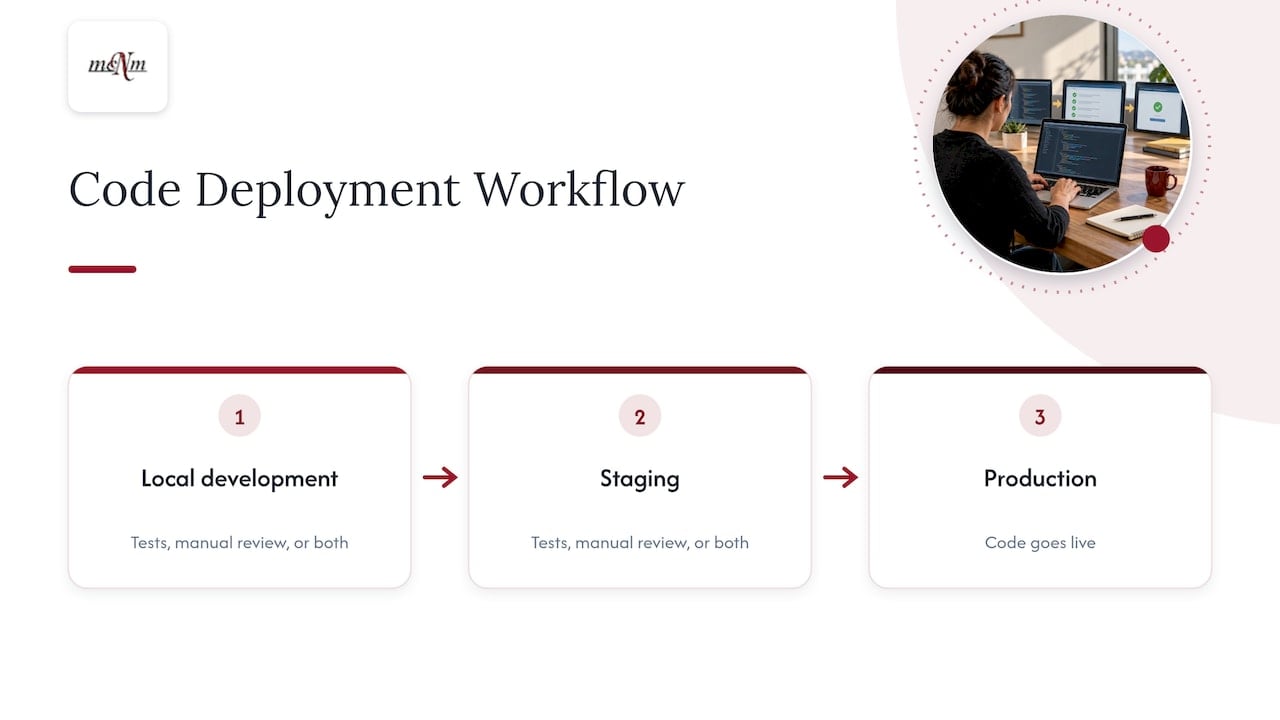
Workflow matters just as much. In an enterprise setup, code does not go straight to the live site. It moves from local development to staging to production, with automated tests, manual review or both at each gate. Editors get roles that match their jobs: a writer drafts, an editor approves, an admin publishes. You can see who changed what and when.
For teams that capture leads by phone, form and chat, connect the site to follow-up. Our Missed Call Calculator shows what unanswered calls may cost you each month, and our marketing automation and CRM services cover the follow-up side.
The development process, step by step
A well-run project follows six phases, as outlined in this enterprise redesign guide:
- Discovery and requirements. List every site, user type, integration and rule. Skipping this step is the most common reason budgets blow up.
- Information architecture and content strategy. Decide how pages, locations and services connect.
- UX design and prototyping. Test layouts on phones first. Most local searches happen on mobile.
- Development and CMS build. Build templates, custom content types and integrations.
- Content migration and SEO preservation. Map every old URL to a new one, with redirects, so rankings carry over.
- QA and launch. Test speed, security, accessibility and forms. Run governance and compliance checks before go-live.
After launch, the work continues: updates, backups, monitoring and fixes. A site with no maintenance plan ages fast.
Where each step goes wrong
- Discovery: vague requirements lead to change orders. Write down who approves content and which systems must connect.
- Architecture: location pages built as copies of one another thin out your search presence. Each needs real local content.
- Design: desktop-only reviews hide mobile problems.
- Build: unvetted plugins create security gaps and slow pages.
- Migration: missing redirects wipe out years of ranking in a week.
- Launch: no rollback plan turns a small bug into an outage.
SEO for enterprise WordPress: plan it before launch
WordPress gives you strong SEO control: clean URLs, structured content and flexible templates. But a big site multiplies mistakes. A bad title pattern in one template shows up on 300 pages.
Before launch, check these items:
- Every old URL has a 301 redirect to its new match
- Each location has its own page, with its own address, hours, reviews and services
- Page titles and headings follow a pattern that includes city and service
- Schema markup is present for businesses and locations
- Pages load fast on mobile
- Google Search Console is verified and tracking from day one
We approach every plan through Search Console, call and conversion data, and judge it by leads, calls and revenue. If you run many locations, our enterprise SEO services are built for multi-location brands and franchises. Our Enterprise & Multi-Location SEO Audit covers up to 25 locations for a one-off $4,997, and you can see the details on the multi-location audit page.
Want to see how your locations show up in local search today? Run our free Local SEO Checkup.
Enterprise WordPress for Las Vegas, Southern California and Arizona brands
Regional businesses have needs a national template ignores. Think of a home-service brand with branches in Las Vegas, Henderson and North Las Vegas. Or a franchise with units in Los Angeles, Orange County, San Diego and the Inland Empire. Or a tourism business in Flagstaff, Sedona and Prescott that swings between slow winters and packed weekends.
Each case points to a different priority:
- Multi-city service brands need one shared design system with separate, locally accurate location pages and Google Business Profiles to match.
- Franchise systems need role controls so each owner edits their own page but cannot break the brand.
- Seasonal tourism sites need hosting that handles spikes without paying for peak capacity all year.
Our team sits at 5450 W Sahara Ave in Las Vegas and works with service businesses across these three regions. That means we know how people there search, and which cities and neighborhoods you need pages for.
What it costs
Be wary of anyone who quotes a project price before discovery. Scope drives cost: number of sites, integrations, languages, compliance needs and migration size. Our Website Design & Build service has no published price, because a fair quote depends on that scope. A free marketing audit is the starting point.
Ongoing costs are easier to see. Our WordPress Website Care Plan is $197 per month. You can read what maintenance includes on our website maintenance page. If you want a one-time review before committing to a build, the Deep-Dive SEO & Marketing Audit is $497 one-off, and the Local Search Visibility Report is $97 one-off. Both are listed on our pricing page.
Questions to ask any developer before you sign
Use this list in your first call:
- How do changes move from development to staging to production?
- Who approves new plugins, and how are updates tested?
- What are the backup frequency, retention period and restore time?
- How will you protect our rankings during migration?
- Will the build meet WCAG 2.1 AA at launch?
- How will you connect the site to our CRM, and what happens if that connection fails?
- What does monthly maintenance include, and who answers when something breaks?
A team that answers all seven clearly has done this before.
Perspective: build for leads, not for the spec sheet
Most enterprise WordPress conversations start with servers and plugins. We start with a different question: what should this site do for the business each month?
For the service brands we work with, the answer is calls, booked jobs and revenue. A site can pass every technical test and still lose leads if the location pages are thin, the phone number is hard to tap on mobile or nobody follows up on a form. So we plan the build around Search Console, call and conversion data, and we judge it by leads and revenue, not by vanity metrics.
Our approach is to treat the website, SEO, maintenance and follow-up as one system. We build fast, mobile-first WordPress sites. We keep them updated through a care plan with published pricing. We connect them to automation so a missed call becomes a text, not a lost customer. And every engagement starts with a free audit, so you see the facts before you spend.
Enterprise-grade does not have to mean slow or opaque. It means clear requirements, clear ownership and clear numbers.
Michael O. Franklin Jr.
Next step: start with a free marketing audit
If you are planning a multi-location or high-traffic WordPress build, we begin with a Free Marketing Audit. It shows how your current site, local listings and search presence perform, and where a rebuild or an upgrade would pay off. From there we scope Website Design & Build, ongoing care and SEO to fit your locations. See our services and pricing for the full list.
Ready to talk? Call (702) 608-4226 or request your free audit today.
FAQ
What is enterprise WordPress development?
It is designing, building and maintaining WordPress sites that meet enterprise demands, such as heavy traffic, many brands or regions, approval workflows and formal security rules. The need comes from your requirements, not your company size. A small multi-location brand can qualify.
Can WordPress handle enterprise-level traffic?
Yes, with the right architecture. That means page and object caching, a CDN, a database tuned for load and servers that scale up when traffic rises. The platform is the same as a small site. The infrastructure around it is what changes.
How do I keep an enterprise WordPress site secure?
Use layers: a web application firewall, restricted admin access, multi-factor authentication, controlled plugin installation, timely updates, logging and tested backups. Write those controls into your contract, as the RFPs above do. Then keep them running with a maintenance plan.
What should a ministry or nonprofit plan for in an enterprise WordPress project?
Plan for accessibility to WCAG 2.1, encrypted data transfers, multi-factor authentication, vulnerability checks and encryption of any personal data you store. Public RFPs from a parish and a Milwaukee nonprofit list these items, so they make a solid starting checklist for your own scope.
How long does an enterprise WordPress project take?
It depends on the number of sites, integrations and pages to migrate. The six phases run in order, and discovery sets the timeline. Ask for a phase-by-phase schedule in your quote.
Sources
- ACF: WordPress for Enterprise, What It Actually Takes
- Hunger Task Force website RFP (Milwaukee, WI)
- Sacred Heart Catholic Community website RFP
- W3C: Web Content Accessibility Guidelines (WCAG) 2.1
- Enterprise Website Redesign: Complete Guide for 2026
Leave a Reply