

Nonprofit marketing automation is software that sends the right email or text to the right person at the right moment, based on what that person just did. For a small team in Las Vegas, Henderson, San Diego or Flagstaff, it means no volunteer sign-up, event inquiry or program request sits unanswered while your staff is busy running programs.
The best setup is simple: one contact database, a handful of well-built workflows, and a person who owns them. We build and manage that kind of system with GoHighLevel and HubSpot, and the sections below show how it works, what to automate first and where it goes wrong.
TL;DR
- Automation sends a message when someone takes an action, such as signing up for an event. A regular email blast sends one message to everyone at once.
- Start with three workflows: a welcome series, an event or volunteer follow-up, and a missed-call text-back.
- Email and text have legal rules. Honor opt-outs, include your mailing address and get consent before texting.
- One organized contact list matters more than any fancy feature.
- Measure replies, sign-ups, show-ups and calls, not just opens.
Table of Contents
- What nonprofit marketing automation actually is
- What to automate first
- Build a workflow in six steps
- Keep it personal
- Email and text rules you must follow
- Choose your tools
- Pair automation with Google Ad Grants
- How to tell if it is working
- Common mistakes
- Perspective
- What a MCNM setup includes
- FAQ
- Next step
- Sources
What nonprofit marketing automation actually is
An email blast sends one message to a big list at once. Automation works differently. A trigger starts it: someone fills out a form, downloads a guide, visits a page or registers for an event. The software then sends a message meant for that one person.
The Association of American Charities (AACT) describes the split in its landscape of digital marketing tools for nonprofits. It separates drip campaigns, which are emails sent on a schedule over days or weeks, from triggered actions, which fire when a person does something. It also separates both from broadcast email, which goes to hundreds or thousands of people at once.
Three parts make the system work:
- A contact database (CRM). This is one place that stores each person, their contact details and what they have done with you.
- Triggers. These are the actions that start a message: a form, a tag, a missed call or a date.
- Workflows. These are the steps that follow: send an email, wait two days, send a text, alert a staff member.
AACT notes that when used well, automation can stand in for a team of people. That lets small organizations punch above their weight. It also warns that setup can be complex and that using it badly can push your audience away. The fix is to start small and build with care.
What to automate first
Do not try to automate everything. Pick the moments where people ask for something and wait too long to hear back. In our experience with local service businesses, speed of response is where most small teams lose people, and the same logic applies to a community organization.
Here are five starting points, in the order we would build them.
1. The welcome series
Someone joins your list. Within minutes they get a short thank-you that says who you are, what you do in your city and what to expect. A second message two or three days later shares one story or one way to get involved. A third points to your next event or program.
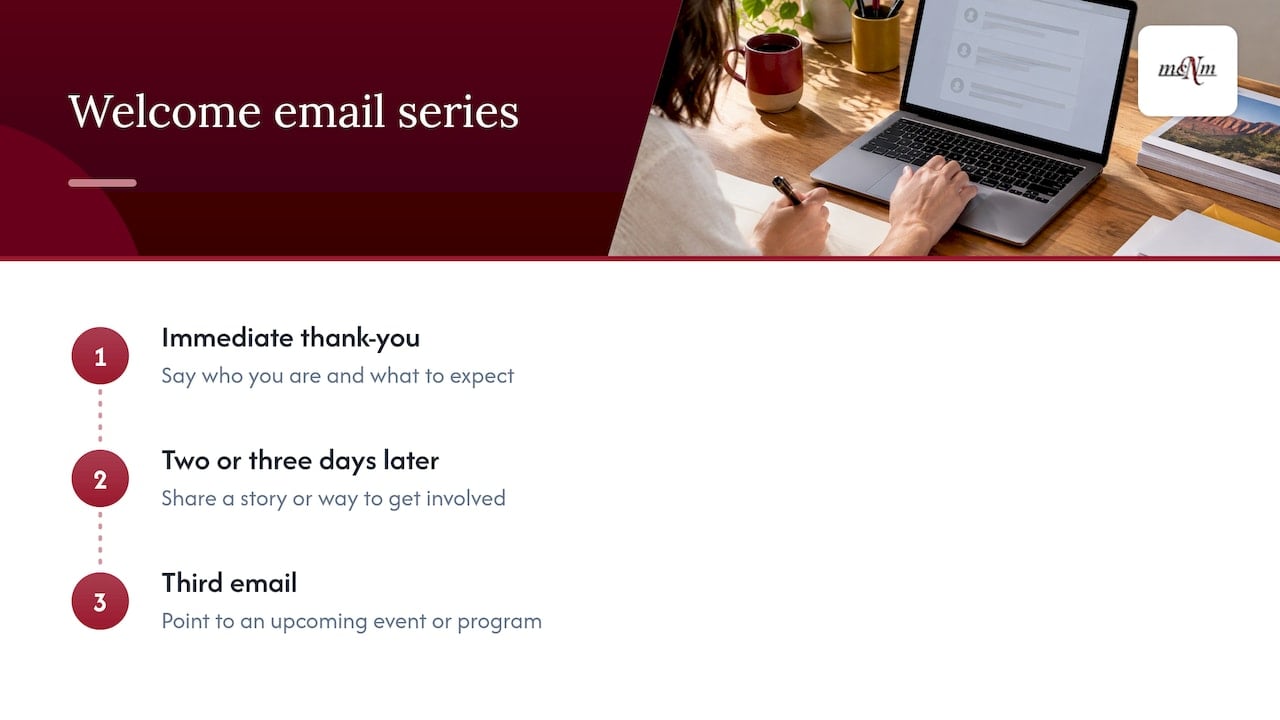
Three emails are enough. Keep each under 150 words.
2. Volunteer and event follow-up
A person signs up to volunteer at a Saturday event in North Las Vegas. The system sends a confirmation right away, a reminder two days before and a thank-you the next morning. If they did not show up, it sends a friendly note with the next date.
This is the workflow that saves staff the most time. It also feels personal, because every message matches what the person did.
3. Program inquiry response
A family or partner fills out a contact form to ask about a program. The system confirms receipt, tells them when to expect a reply and alerts the right staff member. No inquiry gets lost in a shared inbox.
4. Missed-call text-back
Nonprofit phones go unanswered during events, field work and lunch. A missed-call text-back sends a short text such as, “Sorry we missed you. How can we help?” The caller replies, and your team picks up the thread. Our free Missed Call Calculator shows how many calls you may be losing in a month.
5. Re-engagement for quiet contacts
Someone has not opened a message in six months. A short two-email sequence asks if they still want to hear from you. If they do not respond, the system stops emailing them. A smaller, more active list protects your sending reputation.
Build a workflow in six steps
A good workflow is boring to build and easy to explain. Use these steps for each one.
- Name the goal. Write one sentence: “When someone signs up to volunteer, they get a confirmation, a reminder and a thank-you.” If you cannot say it in one sentence, split it into two workflows.
- Choose the trigger. Pick the exact action that starts it. A form submission is clearer than “visited the website.”
- Write the messages. Use plain words at a grade 6 to 8 reading level. Say who is writing, why they are getting the message and what to do next.
- Set the timing. Think about the supporter’s day, not yours. A reminder at 6 a.m. on a Saturday helps no one.
- Add exits. Remove people who reply, unsubscribe or finish the goal. Nothing annoys a person like a reminder for an event they already attended.
- Test before you turn it on. Run through the workflow with a test contact that has every field filled in, one with missing data and one who has unsubscribed. Check that each gets what you expect.
Step 6 is where most do-it-yourself builds fail. A missing first name can turn “Hi Maria” into “Hi ,” and an unsubscribed contact who still gets mail erodes trust fast. We set up and test these paths as part of a CRM build so your first live send is a clean one.
Keep it personal
Automation should feel like a helpful staff member, not a machine. Three habits keep it that way.
- Use only data you trust. First name and the event someone signed up for are safe. Guessing at details is not.
- Set fallback text. If the first name is blank, the greeting should read “Hi there,” not “Hi ,”.
- Respect preferences. Someone who agreed to event reminders did not agree to every other message. Let people choose what they receive and how often.
Always make it easy to reach a human. Our AI chat and text agents hand the conversation to a person when a question needs one, so a caring answer still comes from your team.
Email and text rules you must follow
Email and texting are regulated. A mistake can cost money and damage your name, so build the rules into every workflow.
Email: CAN-SPAM
The Federal Trade Commission explains in its CAN-SPAM compliance guide that the law covers commercial email and is not limited to bulk email. Its core requirements include:
- Do not use false or misleading header information.
- Make clear when a message is an ad.
- Tell recipients where you are located with a valid postal address.
- Give a clear way to opt out and honor it promptly.
Whether a given message counts as commercial depends on its purpose. If you email about ticket sales, merchandise or paid sponsorships, treat the message as commercial. When you are unsure, ask your attorney. Following these rules for every message is the safest habit.
Text messages
Texting has its own rules under federal law, including the Telephone Consumer Protection Act. In practice, get clear permission before you text, say what messages the person will get, and stop when they say stop. Keep a record of when and how each person agreed. Because the rules for texting are strict and carry real penalties, have your attorney review your opt-in wording before you launch a text program.
Build both channels around permission. People who chose to hear from you engage more and complain less.
Choose your tools
You do not need the biggest platform. You need one that does five things:
- Stores contacts and tags them by what they did.
- Runs email and text workflows from the same record.
- Lets you segment, for example volunteers in Henderson versus event guests in Summerlin.
- Handles opt-ins and opt-outs for you.
- Connects to your website forms and phone line.
AACT’s report says one person can maintain an organization’s automation software, and that bringing in an agency or consultant to set it up is worth considering when in-house know-how is limited. That is a fair test for your own team: if nobody has time to learn the platform, hand off the build and keep the ownership.
We work in GoHighLevel and HubSpot. Which fits depends on your size, your existing records and how many channels you use. Our automation tools guide walks through where nonprofit teams hit limits as they scale. For a wider view of channels, see our piece on nonprofit digital marketing strategies.
Pair automation with Google Ad Grants
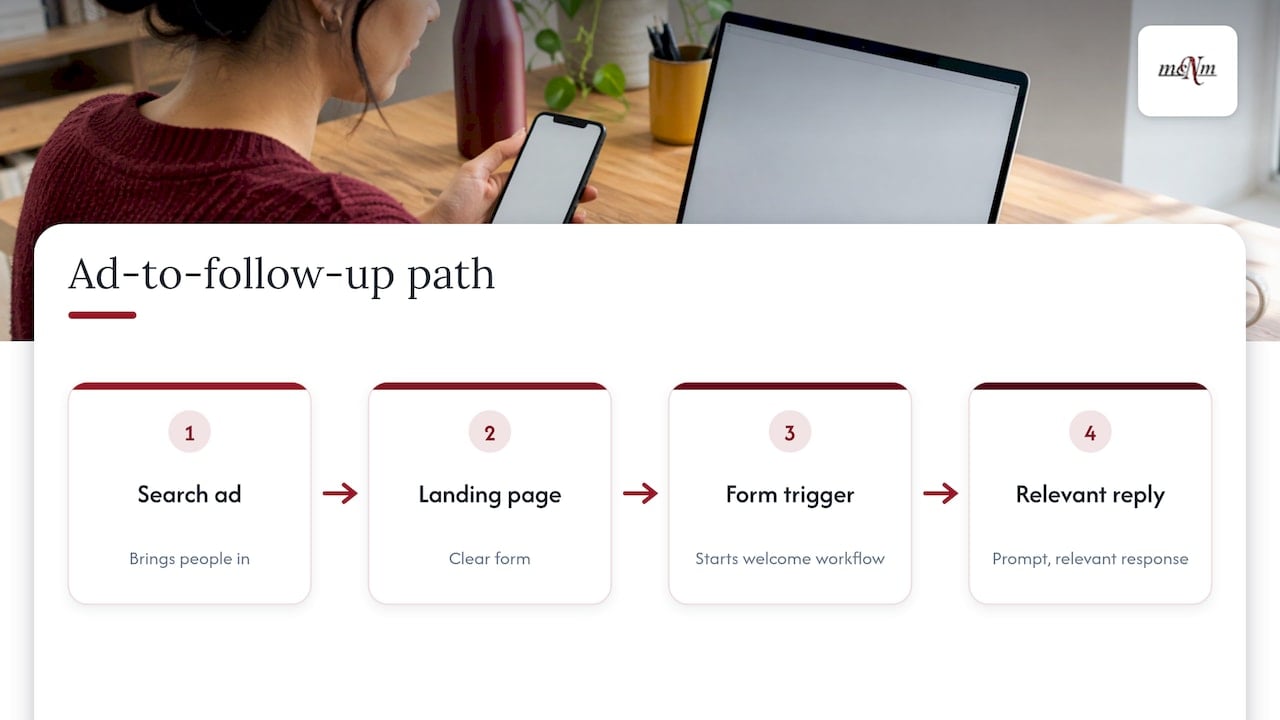
Automation works best when people are arriving. For eligible nonprofits, Google Ad Grants is one of the ways to bring them in. It provides Google Search ad credit so your organization can appear when people search for what you offer. We manage Google Ad Grants accounts for nonprofits.
The pairing is simple. An ad sends a searcher to a landing page with a clear form. The form triggers your welcome workflow. The person gets a prompt, relevant reply instead of silence. Ads without follow-up waste attention you already paid for. Follow-up without ads waits on word of mouth.
How to tell if it is working
Open rates are a weak guide. Email apps can load messages automatically, which makes opens look higher than real interest. Track outcomes tied to your mission instead.
| What to track | Why it matters | Example |
|---|---|---|
| Form-to-reply time | Shows how fast people hear back | Minutes, not days |
| Event show-up rate | Shows if reminders work | Sign-ups who attend |
| Volunteer repeat rate | Shows if people come back | Second shift booked |
| Calls answered or texted back | Shows missed demand | Missed calls with a reply |
| Unsubscribe and complaint rate | Shows if messages feel unwelcome | Spikes after a new workflow |
Review these once a month for 15 minutes. Pick one workflow, change one thing, such as a subject line or send time, and compare results over the next month. Small steady changes beat big rebuilds. Our guide on how to automate digital outreach goes deeper on outreach routines, and our piece on automating marketing for more engagement covers the engagement side.
Common mistakes
- Automating a mess. If your contact list has duplicates and old addresses, clean it first.
- Too many workflows too soon. Launch three. Add more when those run smoothly.
- Sending the same message to everyone. Segment by what people did and where they are.
- No owner. Name one person who checks workflows monthly and fixes broken ones.
- Ignoring opt-outs. Make unsubscribing work every time, on every channel.
- Skipping tests. Test every branch before it goes live.
Perspective
We have built websites since 2004, and the pattern is the same for every organization that depends on local search: people reach out when they are ready, and the group that answers first usually earns the next step.
That is why we run marketing from Search Console, call and conversion data, and judge it by calls, leads and booked results, not vanity numbers. Automation is where that discipline pays off. A form that triggers a prompt reply, a missed call that gets a text back and an inquiry that reaches the right person within minutes all turn attention into action.
Our approach is to keep the system small and clear. We start with a few workflows, publish our prices and hand you a setup your team understands. Our AI agents answer every lead around the clock and pass the conversation to a person when it matters. That is how a small team in Las Vegas, Los Angeles or Prescott can feel bigger than it is without losing the personal touch.
Michael O. Franklin Jr.
What a MCNM setup includes
If you want the system built for you, we publish our prices. Our GoHighLevel Quick-Start Setup is $997 one-off, plus the HighLevel plan. MCNM Growth CRM is $297 per month, plus a $497 setup. If you want responses handled around the clock, our AI Chat & Text Agent is $397 per month plus a $997 setup. See every option on our pricing page.

Not sure where to begin? Every engagement starts with a free marketing audit. We look at your website, your search visibility and your follow-up gaps, then suggest the first workflows to build. Check how you show up in local search with our free Local SEO Checkup, or see our full list of digital marketing services.
FAQ
What is the easiest nonprofit marketing automation to start with?
Start with a welcome email series and an event or volunteer follow-up. Both are short, easy to test and tied to a clear action. Add a missed-call text-back next so no call goes unanswered.
Can a small team run marketing automation?
Yes. AACT says one person can maintain an organization’s automation software. The key is a short list of workflows, a clean contact list and one named owner who reviews results monthly.
Do email laws apply to nonprofits?
The FTC’s CAN-SPAM guide says the law covers commercial email, not just bulk mail. Messages that promote ticket sales, merchandise or sponsorships may fall under it. Include your postal address, label ads clearly and honor every opt-out. Ask your attorney if you are unsure about a specific message.
How much does it cost to set up?
It depends on the platform and the scope. Our GoHighLevel Quick-Start Setup is $997 one-off, plus the HighLevel plan, and MCNM Growth CRM is $297 per month plus a $497 setup. Start with a free marketing audit, or call us at (702) 608-4226.
Next step
Book your free marketing audit at mcnmmarketing.com or call (702) 608-4226. We will map your first three workflows with you.
Sources
- Landscape of Digital Marketing Tools for Nonprofits (AACT)
- CAN-SPAM Act: A Compliance Guide for Business (FTC)
Leave a Reply