
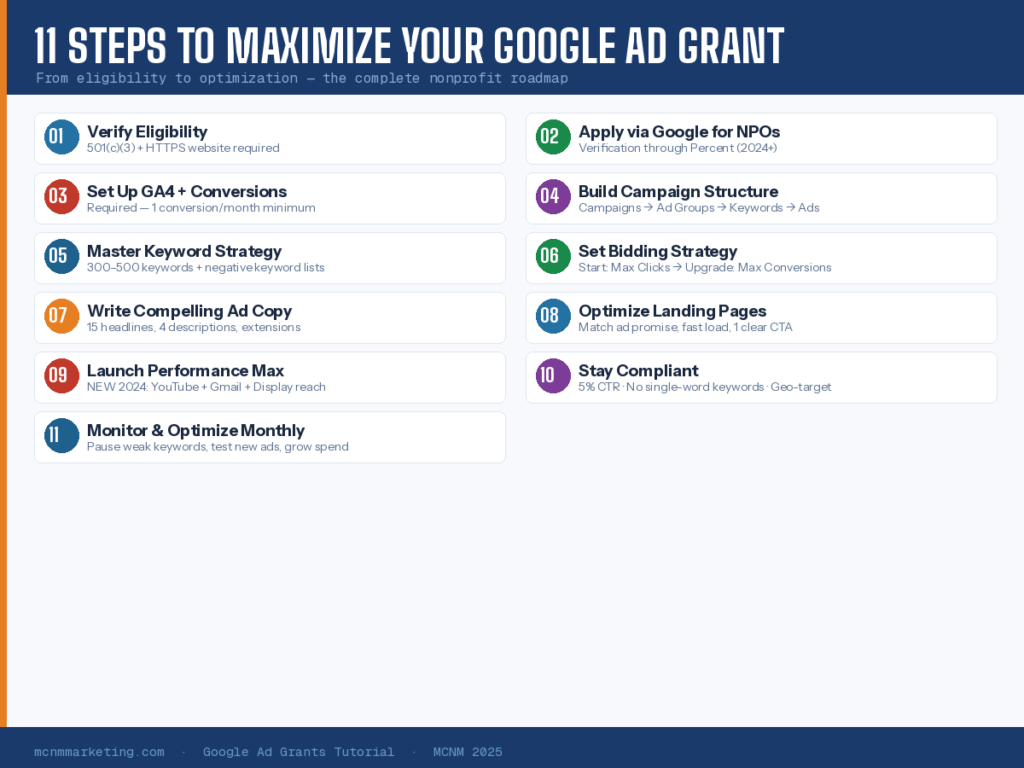
Google Ad Grants is accessed through the Google for Nonprofits program. You must complete this step first.
Application Process
Go to google.com/nonprofits and click “Get Started.”
- Create or sign into a Google account (use an organizational email, not personal Gmail)
- Your organization will be verified through Goodstack — this replaced TechSoup in 2024
- Submit your 501(c)(3) documentation and organizational details
- Wait for verification — typically 2–5 business days
- Once approved for Google for Nonprofits, apply specifically for Google Ad Grants from your account dashboard
- Complete the Ad Grants pre-qualification process
Essential compliance rules to keep your $10,000 monthly Google Ad Grant active in 2025–2026.
This is not optional. As of January 2024, Google requires all Ad Grants accounts to have at least one conversion action set up and receiving conversions monthly. Failure to comply is the #1 reason accounts get suspended.
Set Up Google Analytics 4 (GA4)
Go to analytics.google.com and create a GA4 property for your website
Install the GA4 tracking code on every page of your site (use Google Tag Manager for easier management)
Verify data is flowing in — check the Realtime report after visiting your own site
Link your GA4 account to your Google Ads account: In Google Ads, go to Tools > Linked Accounts > Google Analytics
Define & Track Conversions
Conversions are the actions you want visitors to take. You must track at least one conversion monthly to keep your account active.
A well-organized campaign structure is the foundation of a high-performing Google Ad Grant account. Think of it like a filing system: Campaigns > Ad Groups > Keywords > Ads.
Recommended Campaign Architecture
Create separate campaigns for each major goal or program area
Each campaign should have 2–5 tightly themed ad groups
- Each ad group should contain 10–20 closely related keywords
- Write 3–5 ad variations per ad group for A/B testing
Critical Campaign Settings
Campaign Type: Select “Search” ONLY. Do not enable Search Network or Display Network partners.
No Campaign Objective: When creating a campaign, choose “Create a campaign without a goal”
Location Targeting: Set to your specific service area ONLY. “All countries” is NOT allowed.
Language: Set to the language(s) your audience speaks
Daily Budget: Divide $329 across your campaigns based on priority (e.g., $100/day for Donations, $80 for Volunteers)
Keywords are the engine of your campaigns. The right keywords get your ads in front of people actively searching for what you offer. The wrong keywords drain your budget on irrelevant traffic.
Keyword Best Practices
AVOID single-word or overly generic keywords (e.g., “charity” or “donation” — too broad and expensive)
USE specific, long-tail keywords (e.g., “adopt a rescue dog in Albuquerque” or “volunteer at food pantry near me”)
Target 300–500 total keywords across all campaigns to maximize budget spend
Use Phrase Match and Exact Match keyword types for tighter targeting
Use Google’s Keyword Planner to research search volume and competition
Negative Keywords — Your Secret Weapon
Negative keywords prevent your ads from showing for irrelevant searches. This is one of the most important and often overlooked tactics.
Your bidding strategy determines how Google spends your budget. The default setting is often not the best choice for nonprofits with the Ad Grant.
Bidding Strategy Roadmap
Your ads need to be compelling, relevant, and compliant. Google uses Responsive Search Ads (RSAs), where you provide multiple headlines and descriptions and Google tests the combinations automatically.
Ad Copy Formula
Provide 15 unique headlines (30 characters max each) — include your keyword, a benefit, and a call to action
Write 4 unique descriptions (90 characters max each) — elaborate on your mission and what action to take
Use at least 2 sitelink extensions linking to relevant pages on your site
Add callout extensions (short phrases like “Free Services,” “Serving Albuquerque Since 2005”)
Include structured snippets, call extensions, and location extensions where applicable
Even perfect ads fail if visitors land on a poor page. Your landing page must match the promise of your ad and make the desired action easy to complete.
Landing Page Checklist
Headline on the page matches or closely mirrors the ad headline
The desired action (donate, sign up, apply) is visible above the fold — no scrolling required
Page loads in under 3 seconds on mobile
Single, clear focus — one goal per landing page
Social proof: testimonials, impact stats, photos of real people served
Privacy policy linked in the footer
Mobile-responsive design
Google introduced Performance Max (PMax) campaigns for Ad Grant users at the end of 2024. As of early 2025, it is in wide rollout and represents a significant new opportunity.
What PMax Does Differently
Extends your reach beyond search to YouTube, Gmail, and Display Network
Google’s AI automatically creates and serves targeted ads based on your assets and audience signals
You don’t need to manually set keywords — Google uses your landing page and ad content to target
You can still add negative keywords to prevent irrelevant placements
How to Succeed with PMax
Supply high-quality creative assets: compelling images, video (even simple phone footage), strong headlines
Set strong audience signals to guide the AI (people who visited your site, email lists, interest categories)
Make sure conversion tracking is properly configured — PMax is entirely conversion-driven
Monitor placements and add negative keywords for irrelevant appearances
Run PMax alongside Search campaigns, not as a replacement
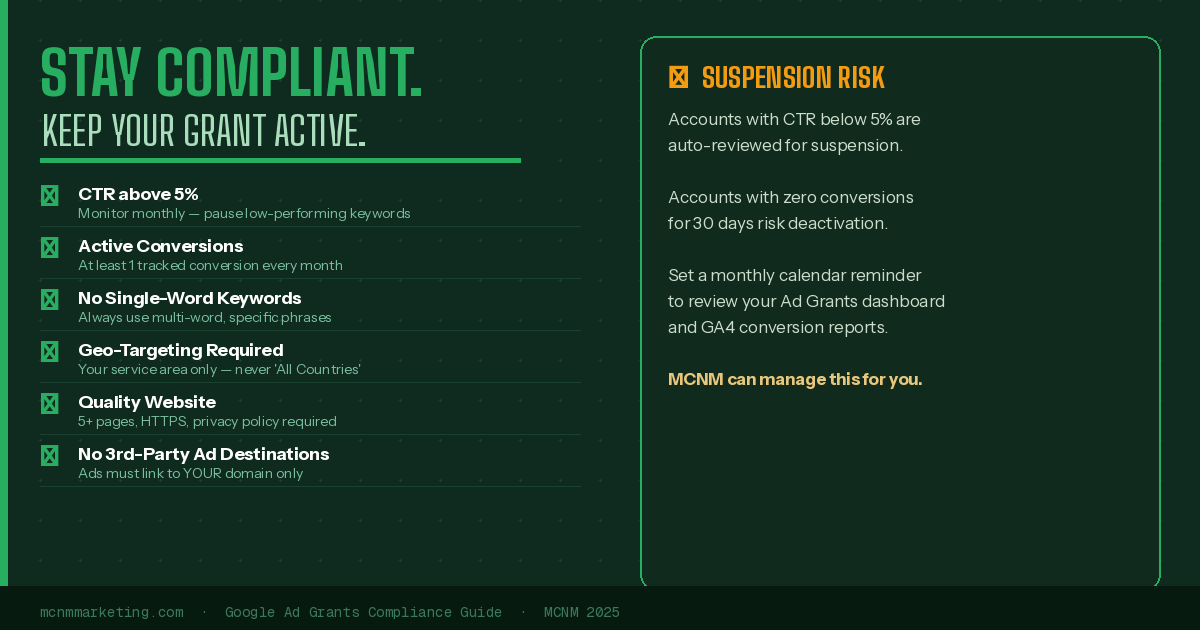
Google can suspend your Ad Grants account for policy violations. Many suspensions happen because organizations don’t know the rules. Here are the non-negotiable compliance requirements:
Google Ad Grants is not a “set it and forget it” program. Consistent monthly monitoring is essential to maintain compliance and improve performance.
Monthly Optimization Checklist
Review CTR across all campaigns — pause low-performing keywords dragging it below 5%
Check Search Terms report — add irrelevant terms as negative keywords
Review conversion data — are you hitting your goals?
Test new ad copy variations — pause the weakest performer in each ad group
Add new keywords based on what’s working in Search Terms
Check budget utilization — if spending less than $329/day, expand keyword lists or add new campaigns
Review landing page performance — high bounce rate = page/ad mismatch
Quarterly Growth Tactics
Create campaigns around new programs, events, or seasonal needs
Build new content pages on your website to expand ad destinations
Review GA4 audience data and refine geographic and demographic targeting
Explore PMax campaigns if not yet running them
Consider working with a certified Google Ad Grants manager for professional optimization
Bonus: Integrating Google Ad Grants with Your SEO Strategy
For maximum digital impact, your Google Ad Grant and SEO strategy should work together, not in silos.
Organizations that treat Google Ad Grants as part of a broader content and SEO strategy consistently outperform those running ads in isolation. Invest in regular blog posts, resource guides, and program-specific landing pages — each one becomes a new advertising opportunity.
Quick Reference: Google Ad Grants at a Glance